
The usual framing of this question is whether K3s is "real" Kubernetes. It is — it is CNCF-conformant, the API is the same API, and your manifests do not care. So that is not the interesting question. The interesting question is what K3s decides for you, and which of those decisions you should undo.
I run four K3s clusters, all on v1.30.6+k3s1. The smallest has one vCPU and six gigabytes of RAM, and it runs a Plex server. That single fact is most of the argument for K3s, but it is not the whole of it, and the parts that took me longest to learn were not about resources at all.
The footprint argument, briefly
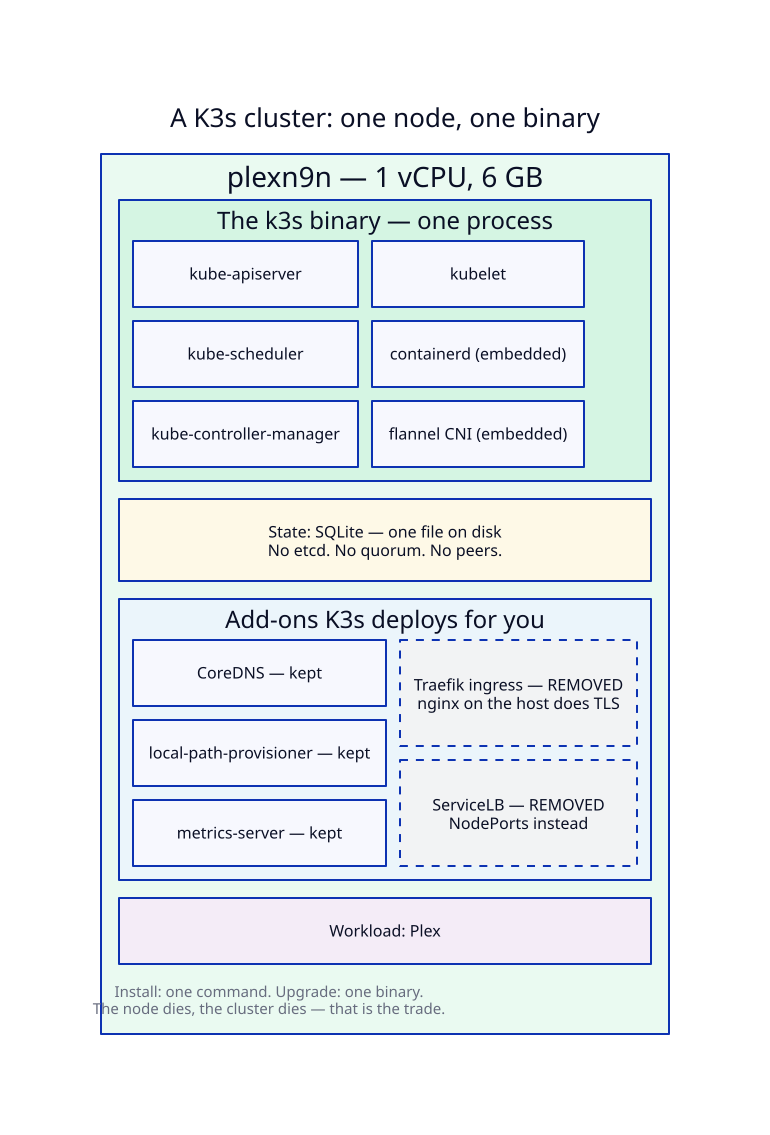
A stock Kubernetes control plane wants an etcd cluster, an API server, a scheduler, and a controller manager, each as a separate thing to install, configure, and keep alive. K3s ships one binary. It embeds containerd, it runs the control plane components in-process, and by default it keeps state in SQLite instead of etcd.
What that buys, concretely, across my four nodes:
- k8slab — 8 vCPU, 16 GB. The main cluster, and the busiest.
- utilitybox — 4 vCPU, 16 GB. Jenkins and internal services.
- n9nweb — 4 vCPU, 8 GB. A DigitalOcean droplet serving public sites.
- plexn9n — 1 vCPU, 6 GB. One core, and it has been fine.
Installing Kubernetes proper on that last box would be an exercise in masochism. Installing K3s on it took one command, and the overhead is small enough that the workload still gets the machine.
Here is what that node actually contains:
And here is the same cluster — same workload, doing the same job — assembled out of upstream Kubernetes components instead:
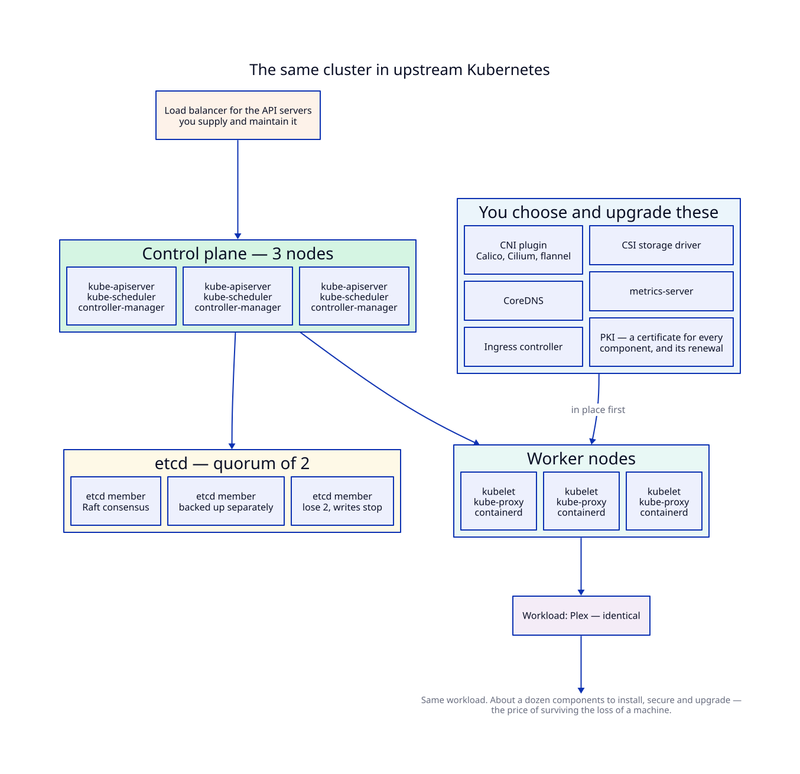
Neither picture is wrong. The second one buys something the first cannot: the cluster survives losing a machine. Every extra box in it is paying for that one property. The question is whether you need it — and for a homelab, honestly, usually not.
The real lesson is which batteries you remove
K3s is opinionated in a way plain Kubernetes is not: it arrives with Traefik as an ingress controller, ServiceLB for load balancing, local-path-provisioner for storage, CoreDNS, and metrics-server. This is genuinely why it is pleasant to start with — you get a cluster that can already run something.
It is also where the thinking happens. Across all four of my clusters I kept local-path-provisioner and metrics-server. None of them runs Traefik. One does not run CoreDNS.
Dropping Traefik was not ideology. On the public droplet, nginx already ran on the host, terminating TLS for several subdomains with certificates that certbot renews. Adding Traefik would have meant two things wanting port 443 and two separate stories about where certificates come from. Instead, nginx proxies to Kubernetes NodePorts on localhost. It is boring, I can debug it with curl and one config file, and the TLS story stays in one place.
That is a reasonable trade. The part I did not anticipate is how quietly it fails.
An Ingress that does nothing looks exactly like one that works
There is an Ingress object on that droplet called resume-ingress. It names the hostname of a site that is, right now, serving traffic perfectly well. It has existed for two hundred and sixty-eight days. It has never done anything at all.
Its ingress class is traefik. There is no Traefik on the cluster. There is no IngressClass resource of any kind. Nothing anywhere is watching that object, and nothing ever has.
Here is the trap: Kubernetes accepted it without complaint. An Ingress is just a record of intent; the controller that acts on it is a separate thing, and if that thing is absent, the API is perfectly happy to store your intent forever. kubectl get ingress lists it. It looks like configuration. The site works, so nothing ever prompted me to question it.
Had I ever tried to change how that site was routed by editing the Ingress, I would have edited a file that nothing reads, watched nothing happen, and gone looking for the bug in Kubernetes — when the routing actually lives in an nginx config on the host.
So if you disable or remove the default ingress controller, the check that tells you the truth is kubectl get ingressclass, not kubectl get ingress. An empty list there means every Ingress on the cluster is decoration. It is worth deleting the stale objects, too, for whoever reads the cluster next — even if that is you in a year.
Disabling CoreDNS: know what you are breaking
The utilitybox cluster runs with --disable=coredns. Everything on it reaches other services by NodePort or by ordinary host DNS, so at the time it looked like one less moving part.
It is one less moving part right up until something wants to resolve something.something.svc.cluster.local. Then it fails, and the failure does not say "you turned off cluster DNS." It says the name does not resolve, which reads like a network problem, and you can lose a genuinely irritating amount of time in the wrong layer — I have.
Disabling a default is fine. Disabling it without being able to say, out loud, what now resolves service names is how you build a cluster that works until it does not. If you do turn CoreDNS off, write down why, somewhere the next person will look.
Cheap clusters change the architecture
The conventional answer to "I have several workloads" is one cluster, several namespaces, and RBAC to keep them apart. That is the right answer when a cluster is expensive to create and operate. K3s makes a cluster cheap enough that it stops being obviously right.
I split by blast radius instead. Media serving, internal tooling, public websites, and the main workloads each get their own single-node cluster. When I break the media cluster — and I do break the media cluster — Jenkins keeps running, because Jenkins is not on it. Each cluster's kubeconfig lives in AWS Secrets Manager and is fetched at runtime by a container built for that one cluster, so there is no ambient context to get wrong. I cannot accidentally apply a manifest to production because I never have production's credentials sitting in a file on my laptop.
The costs are real and worth stating. There is no shared scheduling, so a machine with headroom cannot lend it to a cluster under pressure. There are four upgrades instead of one. Anything genuinely cluster-wide has to be built four times or not at all.
What you are actually giving up
Single-node K3s has no control plane high availability, because the node is the cluster. If it goes down, everything on it is down, and SQLite means there is no quorum to keep anything alive. That is an acceptable answer for a homelab and an unacceptable one for anything with users who did not choose you.
You also lose multi-node scheduling, and much of the cloud-native autoscaling ecosystem assumes infrastructure you do not have. Reach for full Kubernetes — ideally a managed control plane — when you need real HA, genuine multi-tenancy, or the scale where a dedicated control plane stops being overhead and starts being necessary.
The summary I would give my past self
K3s is not a lesser Kubernetes. It is Kubernetes with the assembly already done and a set of defaults chosen on your behalf. The install is the easy part and it is where every tutorial stops. The actual work is deciding which of those defaults belong in your environment, then being honest about what you broke when you took one out — because Kubernetes will not tell you. It will accept a configuration that nothing implements and report no error at all.
Next in this series: installing K3s with Ansible, so that the decisions above are written down as code rather than remembered.