
"Walk me through what happens when you power on a Linux server" is one of the oldest interview questions in operations, and it's still a good one. It has a short answer anyone can recite and a long answer that shows whether you've ever had to fix a machine that wouldn't come up.
Most boot-process infographics give you the short answer, and a few details tend to get lost in the simplification: the initramfs usually disappears, the boot loader "loads libraries", and ~/.bashrc somehow becomes part of booting. Here's the longer version, in seven stages, for a typical x86 machine running a systemd-based distribution.
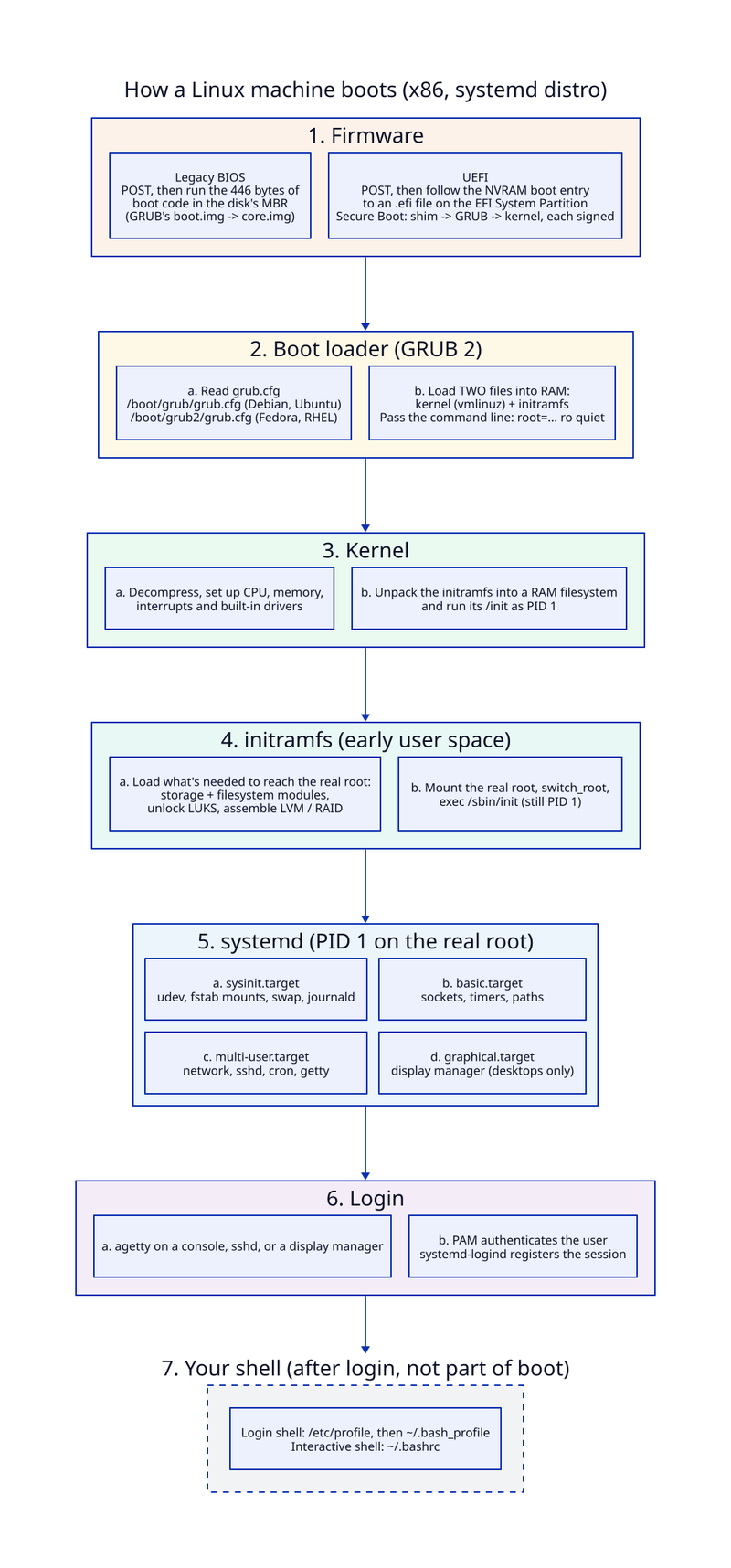
1. Firmware: BIOS or UEFI
Power comes on and the CPU starts executing firmware from flash on the motherboard. The firmware runs POST (power-on self test), initializes the hardware, and then has to find something to boot. How it does that depends on which kind of firmware you have.
- Legacy BIOS reads the first 512 bytes of the boot disk, the MBR. Only 446 of those bytes are code (the rest is the partition table and the
0x55AAsignature), which is far too small for a real boot loader. GRUB's tinyboot.imglives there and its only job is to load the largercore.imgfrom elsewhere on the disk. - UEFI doesn't execute boot sectors. It reads boot entries from NVRAM (
efibootmgrshows them) and runs an.efiprogram from the EFI System Partition, a small FAT32 partition. With Secure Boot on, that program is usuallyshim, signed by Microsoft, which verifies GRUB, which verifies the kernel.
2. The boot loader (GRUB 2)
GRUB reads its configuration: /boot/grub/grub.cfg on Debian and Ubuntu, /boot/grub2/grub.cfg on Fedora and RHEL. (You'll sometimes see /etc/grub2.cfg quoted; on Red Hat–family systems that's just a symlink.) You don't edit that file by hand: it's generated by grub-mkconfig/update-grub from /etc/default/grub and /etc/grub.d/.
After the menu, GRUB loads two files into memory, the compressed kernel (vmlinuz) and the initramfs, and passes the kernel its command line: root=..., ro, quiet and whatever else you've configured. It doesn't load libraries; that's user space's job, much later.
3. The kernel
The kernel decompresses itself, sets up memory management, the scheduler and interrupts, and initializes the drivers built into it. Then it unpacks the initramfs (a cpio archive) into a RAM-backed filesystem and runs /init from it as PID 1.
4. The initramfs: the stage most diagrams skip
Why not mount the root filesystem straight away? Because the kernel often can't. The driver for your storage controller might be a module sitting on the disk it needs to read. The root might be on LVM, on software RAID, encrypted with LUKS, or on the network.
The initramfs is a small early user space whose job is to reach the real root: load the right modules, prompt for the LUKS passphrase, assemble LVM or RAID, mount the real root filesystem. Then it calls switch_root and execs the real /sbin/init. Because it's an exec, the process ID doesn't change: the real init inherits PID 1. (On dracut-based distributions like Fedora and RHEL, the initramfs itself runs systemd, so "systemd is the first process" is true twice.)
If there's no initramfs, the kernel mounts root= itself and runs /sbin/init directly. That works when everything it needs is built in.
5. systemd, PID 1 on the real root
systemd starts at default.target, which is a symlink to multi-user.target on servers or graphical.target on desktops (systemctl get-default). It works backwards through the dependencies and starts units in parallel wherever the ordering allows. That's why modern machines boot so much faster than the old serial init scripts. Roughly:
sysinit.target: udev, filesystems from/etc/fstab, swap, the journalbasic.target: sockets, timers, pathsmulti-user.target: networking, sshd, cron, and gettys on the consolesgraphical.target: the display manager, if there is one
PID 1 is special: if it ever exits, the kernel panics. Also, PID 1 isn't always systemd: some distributions still ship SysV init, OpenRC or runit. The stages before this one are the same either way.
6. Login
You log in through agetty on a console, sshd, or a graphical display manager. PAM does the authentication, and systemd-logind registers your session.
7. Your shell (after login, not part of boot)
Only now do shell startup files run. A login shell reads /etc/profile, then the first of ~/.bash_profile, ~/.bash_login or ~/.profile it finds. Interactive non-login shells read ~/.bashrc, which is why most ~/.bash_profiles source it. None of this happens at boot: a server with nobody logged in never reads any of it.
When it doesn't boot
This is where the interview question earns its keep. Knowing the stages tells you where to look.
- No boot device found: the firmware stopped. Check the boot order,
efibootmgr, and the EFI System Partition. - **A
grub>orgrub rescue>prompt:** the boot loader stopped.grub.cfgis missing or broken; reinstall GRUB. - Kernel panic, unable to mount root: the kernel or initramfs stopped. Check
root=, or a driver missing from the initramfs (rebuild it withdracutorupdate-initramfs). - **Dropped to a dracut or
(initramfs)shell:** the initramfs couldn't find the root device, often a LUKS or LVM problem.rd.breakstops here on purpose. - Hangs, or drops to emergency mode: usually a failing mount in
/etc/fstab;nofailexists for this. - Boots, but slowly:
systemd-analyze blameandsystemd-analyze critical-chain.
Two kernel parameters worth memorizing: systemd.unit=rescue.target (single-user mode) and systemd.unit=emergency.target (even less). And after any bad boot, journalctl -b -1 shows you the previous one.
The short answer gets you through the question. The long answer is what you'll need when the machine is down and the diagram doesn't have a box for what went wrong.